3ds Max Training in Trichy

Overview of 3ds Max

3DS MAX is one of the most powerful and industry-leading 3D computer graphics applications designed for 3D modeling, animation, rendering, and visualization. Developed by Autodesk, it is widely used for game development, virtual reality, interior design, architectural visualization, film and television production, and design visualization projects. With its efficient system design, powerful polygon modeling functionality, and extensive plug-in support, 3ds Max is recognized by many scholars and professionals as a versatile and powerful 3D software with a wide user base across multiple industries.

At our 3DS MAX training institute in Trichy, we provide expert guidance to help you master this comprehensive 3D tool, whether you’re an architecture student, interior designer, game developer, or animation professional.

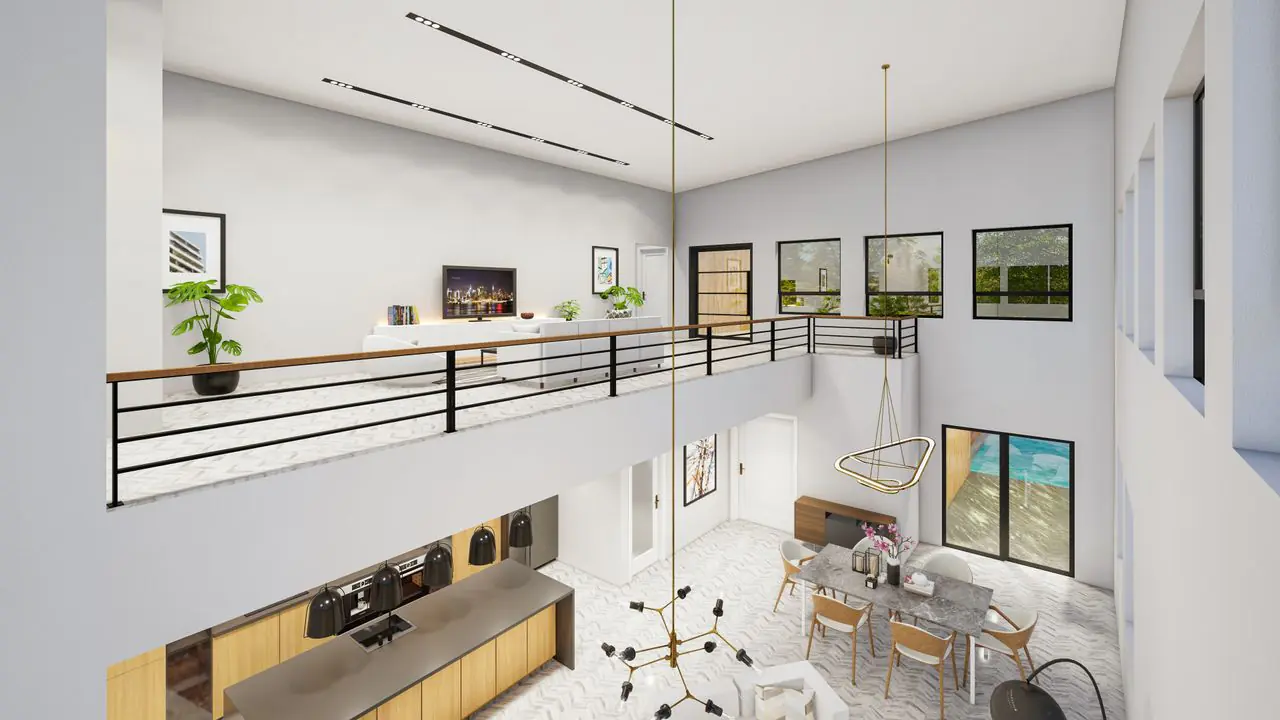
Spacious modern home interior with minimalist design and open balcony view.

Where is 3ds Max Used?

3DS MAX is extensively used across multiple creative and technical industries for 3D modeling, architectural visualization, animation, and visual effects. It’s one of the most in-demand 3D software tools used by professionals worldwide.

✅ Industries That Use 3ds Max:
Architecture & Interior Design

  • Architectural visualization and walkthroughs
  • Interior and exterior design rendering
  • 3D building models and presentations
  • Residential and commercial project visualization

Game Development

  • 3D character and environment modeling
  • Game asset creation
  • Virtual reality (VR) and augmented reality (AR) applications

Film & Television Production

  • 3D animation and visual effects
  • Character rigging and animation
  • Scene creation and cinematic rendering

Product Design

  • Product visualization and prototyping
  • Industrial design presentations
  • Furniture and consumer goods modeling
  • Virtual Reality & Augmented Reality

VR environment creation

  • AR content development
  • Immersive experience design
  • Visual Effects & Motion Graphics

Particle systems and dynamics

Special effects creation

Motion graphics and title sequences

Where is 3ds Max Used?

✔️ Master industry-standard software for 3D modeling and animation
✔️ Create photorealistic renders and professional 3D visualizations
✔️ Boost your career prospects in architecture, gaming, film, and design
✔️ Build a strong portfolio with hands-on project work
✔️ Learn to create stunning walkthroughs and presentations
✔️ Gain skills that are consistently in high demand across creative industries
✔️ Unlock opportunities in game design, VFX, and architectural visualization

Why Should You Learn Especially at DOT Institute, Trichy?

DOT Institute is recognized as the best 3ds Max training institute in Trichy for architecture students, interior designers, and 3D artists. With over 25+ years of experience, we specialize in practical 3D training for the creative and construction industry, offering hands-on project work and real-time modeling practice.

⭐⭐⭐⭐⭐

Benefits of Learning AutoCAD at DOT Institute

🎓 25+ Years Experienced Staff – Architecture and design faculty with real industry knowledge.

🛠️ Practical Environment – Focus on tool usage, 3D modeling workflows, and project presentation.

📚 Updated Curriculum – Designed for B.Arch, B.E., B.Tech, diploma students, and creative professionals.

💰 Very Low Fees – Best value in Trichy for professional 3ds Max certification.

📆 Flexible Course Duration – Fast-track, regular, weekend, and online classes available.

📍 Top-Rated on Google Maps – Verified training center near Chathiram Bus Stand, Woraiyur, Thillainagar, and Central Bus Stand.

💼 Placement Support – Job referrals, resume writing, and interview training included.

Whether you’re searching for “3ds Max course near me” or “3D modeling training in Trichy”, DOT Institute is your best choice.

Get Trained. Get Certified. Get Hired.

If you’re an architecture student, interior designer, game developer, or creative professional looking to build a career in 3D modeling, animation, and visualization, start with 3ds Max at DOT Institute.

📍 Find us easily on Google Maps – Just search for “DOT Institute 3ds Max Trichy”
📞 Call us now to reserve your free demo class and get detailed course info: +91 99942 99879
🎯 Get certified with the most trusted 3ds Max course in Trichy

🔧 3ds Max Syllabus – Job-Oriented Training in Trichy (DOT Institute)

Looking to master 3ds Max for core architecture, design, and animation jobs? Our expertly designed syllabus is suitable for B.Arch, B.E., B.Tech civil engineering students, interior designers, animators, and working professionals in Trichy. The course focuses on 3D modeling, architectural visualization, texturing, lighting, animation, and rendering.

Below is the detailed syllabus covered at DOT Institute – the Best 3ds Max Training Center in Trichy.

📘 3DS MAX Course Syllabus – Best 3D Training in Trichy
Looking to learn 3DS MAX from scratch or upgrade your 3D skills? Our 3DS MAX training in Trichy is divided into well-structured, industry-relevant modules covering everything from 3D modeling to rendering and animation.

🧩 Module 1: Introduction to 3ds Max

  • Overview of the 3ds Max Interface
  • Understanding 3D Space and Coordinates
  • Working with Viewports and Navigation Tools
  • Configuring User Interface and Preferences
  • Creating and Managing Project Files
  • Keyboard Shortcuts and Productivity Tips
  • 3ds Max beginner course, 3D software basics, architecture visualization training

⚙️ Module 2: 3D Modeling Fundamentals

  • Creating Standard Primitives and Extended Primitives
  • Working with Objects: Selection, Transformation, and Cloning
  • Understanding Modifier Stack and Modifiers
  • Box Modeling and Polygon Modeling Techniques
  • Subdivision Surface Modeling
  • Boolean Modeling and Compound Objects
  • 3D modeling in 3ds Max, polygon modeling training

🧱 Module 3: Advanced Modeling Techniques

  • Spline Modeling: Creating and Editing Splines
  • Lathe, Loft, and Sweep Modifiers
  • Graphite Modeling Tools
  • Editable Mesh and Editable Poly
  • Working with Sub-Object Modes: Vertex, Edge, Polygon, Element
  • Symmetrical Modeling and Mirroring Techniques
  • Creating Complex 3D Models and Architectural Objects
  • 3ds Max advanced modeling, architectural modeling training Trichy

📄 Module 4: Architectural & Interior Modeling

  • Creating Parametric Walls, Doors, and Windows
  • Modeling Stairs, Railings, and Roofs
  • Importing AutoCAD Plans into 3ds Max
  • Creating Floor Plans and Building Models
  • Interior Detailing: Furniture, Fixtures, and Accessories
  • Exterior Modeling: Buildings, Landscapes, and Site Elements
  • 3ds Max architectural visualization, interior design training Trichy

🌬️ Module 5: Materials & Texturing

  • Understanding Material Editor (Slate and Compact)
  • Creating and Applying Materials
  • Working with Diffuse, Bump, and Reflection Maps
  • UVW Mapping and Unwrap UVW
  • Applying Textures: Bitmap and Procedural Maps
  • Creating Realistic Materials: Glass, Metal, Wood, Fabric
  • Multi/Sub-Object Materials
  • 3ds Max materials and texturing, rendering training Trichy

🧰 Module 6: Lighting & Illumination

  • Understanding Light Types: Standard and Photometric
  • Adding Spotlights, Omni Lights, and Skylights
  • Creating Sunlight Systems and Daylight Simulation
  • Global Illumination and Light Setup
  • Shadow Parameters and Effects
  • Three-Point Lighting Method
  • Indoor and Outdoor Lighting Techniques
  • 3ds Max lighting course, architectural lighting training Trichy

🧪 Module 7: Camera & Rendering

  • Adding and Editing 3ds Max Cameras
  • Understanding Camera Types and Lenses
  • Camera Animation and Walkthrough Creation
  • Rendering Settings and Output Formats
  • Working with Scanline, Mental Ray, and V-Ray
  • Improving Rendering Quality
  • Creating Photorealistic Renders
  • 3ds Max rendering course, V-Ray training Trichy

🎨 Module 8: Animation & Visual Effects

  • Understanding Keyframe Animation
  • Creating and Editing Animations
  • Animation Curve Editor and Dope Sheet
  • Camera Path Animation and Walkthroughs
  • Particle Systems and Dynamics
  • Creating Visual Effects: Fire, Water, Smoke
  • Rendering Animation and Video Outputs
  • 3ds Max animation course, VFX training Trichy

More Modules 8 to 10,etc & More Syllabus Click Here

🎯 Who Can Join?

This course is ideal for:

  • B.Arch Architecture and Interior Design students
  • B.E./B.Tech Civil Engineering students
  • Diploma in Architecture and Design
  • Game Developers and Animators
  • Graphic Designers and Multimedia Professionals
  • Job seekers and working professionals in creative and design industries

📍 Available at DOT Institute – Trichy's Top-Rated 3D & CAD Training Center

Find us near: Chathiram Bus Stand, Thillainagar, Woraiyur, Central Bus Stand, Lalgudi, and Srirangam

📍 Google Maps Search: 3ds Max Course in Trichy – DOT Institute

⏰ Flexible Timings: Weekday, Weekend, and Fast-Track Batches Available

📜 Certification: Industry-Recognized Certificate with Job Assistance


✅ Enroll Now in the Best 3ds Max Course in Trichy!
🎓 Looking for top-quality 3ds Max training in Trichy? You’re in the right place! Our job-oriented 3ds Max course is designed for architecture, design, and animation students who want to build real-world 3D modeling and visualization skills.

📞 Call now for a FREE demo class and detailed course brochure:
📱 +91 99942 99879

Batch Schedule

Weekdays Batch Timing
Monday - Friday Session Timing

10:00 AM – 12:00 PM |

12:00 PM – 02:00 PM |

03:00 PM – 05:00 PM |

06:00 PM – 09:00 PM

Weekend Batch Timing
Saturday - Sunday Session Timing

11:00 AM – 02:00 PM

Free Demo

Student More Interested

  • AutoCAD
  • Solidworks
  • Civil AutoCAD
  • Revit
  • Python
  • Photoshop
  • E3d
  • PDMS
  • TEKLA
  • Revit MEP
  • ANSYS
  • CATIA
  • PTC Creo
  • Java
  • Web Development
  • Graphic Design
  • Coreldraw
  • Adobe Illustrator
  • MS Office
  • Tally Prime
  • Web Design

Trichy Branch | DOT Institute

Address: 12A, 3rd Floor, Periyasamy Tower,

Chathiram Bus Stand, Trichy – 620002
Phone: +91 99942 99879 | +91 75 98 009 444 | +91 75 98 010 444
Email: dottrichybranch1@gmail.com
Website: www.dotinstitute.co.in

Nearest Location for DOT Institute

  • 3ds Max course in Trichy

  • Best 3ds Max training for architecture students

  • 3ds Max classes near Chathiram Bus Stand

  • 3D modeling training in Woraiyur, Srirangam

  • 3ds Max course for diploma students Trichy

  • 3ds Max training with placement in Trichy

  • Job-oriented 3ds Max syllabus

Our Branch Locations is Processing

3ds Max Training in Thillainagar

3ds Max Training in Woraiyur

3ds Max Training in Lalgudi

3ds Max Training in Srirangam

3ds Max Training in Melapudur

3ds Max Training in Cantonment

3ds Max Training in Tennur

3ds Max Training in Chintamani

3ds Max Training in Palakkarai

3ds Max Training in Manachanallur

3ds Max Training in Subramaniapuram

3ds Max Training in Vayalur Road area

3ds Max Training in Ariyamangalam

3ds Max Training in Edamalaipatti Pudur (E.Pudur)

3ds Max Training in Ponmalai (Golden Rock)

3ds Max Training in Bheema Nagar

3ds Max Training in Salai Road

3ds Max Training in Singarathope

3ds Max Training in Puthur

3ds Max Training in Senthaneerpuram

3ds Max Training in Ramalinga Nagar

3ds Max Training in Khajamalai

3ds Max Training in Shastri Road

3ds Max Training in Mambazha Salai

3ds Max Training in Kollidam Road

3ds Max Training in Bishop Heber College Area

3ds Max Training in Gandhi Market Area

3ds Max Training in Cauvery Bridge Area

best cad training institute-trichy best cad training institute-programming training institute-autocad training institute-computer training institute

Industrial CAD Training Institute

Mechanical CAD | Civil CAD | Programming | Graphic Design | Office Administration

Contact

Chat Icon