Creo Training in Trichy
PTC Creo
Overview of Creo
Creo, developed by PTC, is revolutionizing the product design and manufacturing industry. It combines cutting-edge design tools with innovative technology like:
🚀 Additive Manufacturing
🌐 Internet of Things (IoT)
📐 Model-Based Definition (MBD)
🕶️ Augmented Reality (AR)
With Creo, you can design smarter, faster, and more efficiently by connecting digital models to real-world applications. From concept to production, Creo supports the full product development lifecycle.
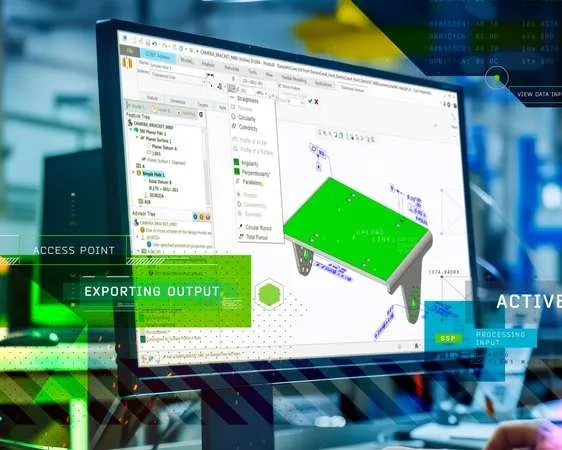
Creo by PTC is one of the most powerful 3D CAD software tools used globally for mechanical design, simulation, and manufacturing. It supports parametric modeling, sheet metal design, plastic part design, mechanism simulation, and even real-time FEA (Creo Simulation Live).
Whether you’re a mechanical engineering student, diploma holder, or design professional, Creo will help you gain hands-on industry skills that are in high demand.
Where is Creo Used?
Creo is widely used across global industries including:
✔️ Parametric & Freestyle Surfacing
✔️ Mechanism Design & Simulation
✔️ Plastic Component Design
✔️ Model-Based Definition (MBD)
✔️ Sheet Metal & Structural Design
✔️ Assembly Management & Optimization
✔️ Augmented Reality (AR) Design Integration
✔️ 2D Drafting & Manufacturing Drawings
✔️ Reverse Engineering
✔️ Rendering & 3D Animation
✔️ Smart Connected Product Design
✔️ Tool & Die Design
✔️ CNC Machining & Production Ready Outputs
Creo software applications, Creo training for mechanical engineers, CAD software in Trichy
Why Learn Creo?
🌍 Used by top global companies to enhance innovation and productivity
⚙️ Real-time Creo Simulation Live for stress analysis during design
🧠 Flexible & parametric modeling with advanced surfacing tools
🔗 Easy AR integration for client collaboration
🏆 Recognized as the most advanced mechanical CAD software
📍 Why Learn Creo at DOT Institute – Trichy’s Leading CAD Training Center?
DOT Institute is recognized as the best Creo training institute in Trichy for mechanical engineers and diploma students. With over 25+ years of experience, we specialize in practical CAD training for the mechanical field, offering hands-on project work and real-time drafting practice.
⭐ Benefits of Learning Creo at DOT Institute:
🎓 25+ Years Experienced Staff – Mechanical engineering faculty with real industry knowledge.
🛠️ Practical Environment – Focus on tool usage, fabrication drawings, and mechanical assemblies.
📚 Updated Curriculum – Designed for B.E., B.Tech, and diploma students in mechanical and production fields.
💰 Very Low Fees – Best value in Trichy for professional AutoCAD certification.
📆 Flexible Course Duration – Fast-track, regular, weekend, and online classes available.
📍 Top-Rated on Google Maps – Verified training center near Chathiram Bus Stand, Woraiyur, Thillainagar, and Central Bus Stand.
💼 Placement Support – Job referrals, resume writing, and interview training included.
Whether you’re searching for “Creo course for mechanical engineers near me” or “diploma CAD training in Trichy”, DOT Institute is your best choice.
We are located near key areas such as:
📍 Chathiram Bus Stand
📍 Woraiyur
📍 Srirangam
📍 Thillainagar
📍 Central Bus Stand
📍 Lalgudi
Best Creo (Pro-E) Training in Trichy – Join DOT Institute Today!
🎓 Looking to master Creo/Pro-E, one of the most powerful 3D CAD tools in the mechanical engineering world? Learn from the best at DOT Institute, Trichy’s top-rated CAD training center with over 25 years of expert teaching experience.
📞 Call now for FREE demo & course brochure: +91 99942 99879
💼 Career Opportunities After Completing Creo Course:
🎯 After completing our Creo training in Trichy, you can work in:
- Mechanical Design Engineer
Tool & Die Designer
Sheet Metal Engineer
Product Development Engineer
CAD Analyst
FEA Simulation Engineer
Automotive, Aerospace, and Manufacturing Sector Jobs
Get Trained. Get Certified. Get Hired.
If you’re a mechanical or diploma student looking to build a career in product design, manufacturing, or CAD drafting, start with Creo at DOT Institute.
📍 Find us easily on Google Maps – Just search for “DOT Institute Creo Trichy”
📞 Call us now to reserve your free demo class and get detailed course info: +91 99942 99879
🎯 Get certified with the most trusted Creo mechanical course in Trichy
📘 Creo (Pro-E) Course Syllabus – Best CAD Training in Trichy (DOT Institute)
Unlock your career in product design, manufacturing, and simulation with the most in-demand 3D CAD software: Creo by PTC. Our Creo training in Trichy is broken down into industry-relevant modules designed for job-oriented learning.
📘 Creo Course Syllabus – Best 3D CAD Training in Trichy
Looking to learn Creo from scratch or upgrade your CAD skills? Our Creo training in Trichy is divided into well-structured, industry-relevant modules covering everything from 3D modeling to simulation and rendering.
30-Day PTC Creo Parametric Course Syllabus (Trichy, Tamil Nadu, India)
In Tiruchirappalli (Trichy, TN), a manufacturing hub noted for fabrication and machining demand for skilled CAD designers is high. This 30-day PTC Creo Parametric syllabus covers core mechanical CAD modules (sketching, 3D part modeling, assemblies, drawing) through advanced topics (sheetmetal design, surface modeling) in a step-by-step sequence. Each session blends theory with hands-on practice and real-world project work. Key program features include PTC certification preparation and career support (resume/interview coaching) to boost employability, while topics are phrased with location keywords (e.g. Trichy, Srirangam, Chathiram) to optimize local search visibility.
Comprehensive CAD curriculum: Core parametric design skills (sketching, part modeling, assemblies, drawings) are taught sequentially, with advanced modules like sheetmetal design (walls, bends, flat patterns)and basic surfacing.
Hands-on learning & projects: Each day includes lab exercises and real-time design projects (as recommended by industry training) for practical mastery.
Certification & career focus: Training is led by PTC-certified instructors and includes certificate assessments. The course culminates in PTC Creo certification prep, mock exams, and resume/interview guidance.
| Day | Topic & Activities (with SEO keywords) |
|---|---|
| Day 1 | Introduction to PTC Creo Parametric (Basics) (Best Creo training in Trichy) – Course overview and software setup; UI navigation, sketcher interface, and basic 2D sketching tools. Establish design intent and coordinate systems. |
| Day 2 | 2D Sketching & Drawing (Creo CAD institute near me) – Advanced sketcher tools: constraints, dimensions, fillets/chamfers, and construction geometry. Begin 2D drawing views: base views, projected views and annotations. |
| Day 3 | Part Modeling I: Basic Features (Creo course near Chathiram) – Create 3D solid parts using Extrude and Revolve features. Practice creating datum planes and axes, and simple ribs/profiles. |
| Day 4 | Part Modeling II: Feature Operations (PTC Creo parametric Trichy) – Use holes, shells, drafts, rounds, and chamfers to refine parts. Apply copy, mirror, and pattern tools to replicate geometry. |
| Day 5 | Patterning & Reuse, Intro to GD&T (Creo mechanical course in Trichy) – Explore pattern features (linear, circular, variable) and family tables. Introduction to Geometric Dimensioning & Tolerancing (GD&T) concepts for precision. |
| Day 6 | Assembly Modeling I (Creo CAD near Srirangam) – Learn assembly design basics: inserting components, defining constraints (mate, align, insert) and using assembly explorer. Understand simple top-down assembly workflow. |
| Day 7 | Assembly Modeling II (Creo training Woraiyur) – Advanced assembly techniques: assembly features, flexible components, interference checking, exploded views. Practice aligning multi-part assemblies and fixing components. |
| Day 8 | 2D Drawing & Documentation I (Creo drawing course Central Bus Stand) – Lay out drawing sheets, create orthographic views, and basic annotation (dimensions, notes). Use layers and templates. |
| Day 9 | 2D Drawing & Documentation II (Creo drafting K.K. Nagar) – Continue detailing drawings: section views, auxiliary views, and detailed annotations. Add bill of materials (BOM) tables and title blocks. |
| Day 10 | Design Review & GD&T (Creo manufacturing Lalgudi) – Review previous work with group critique. Introduce GD&T standards (datums, tolerances, datums hierarchy) and apply tolerances to drawing dimensions. |
| Day 11 | Sheetmetal Design I (Creo sheet metal BHEL) – Learn Creo’s sheetmetal environment: create flat & flange walls, bends, and punches. Discuss material properties and K-factor. |
| Day 12 | Sheetmetal Design II (Creo sheet metal Chathiram) – Advanced sheetmetal: add reliefs, rips/hems, bend-back; generate flat pattern and bend order table. Create drawings from sheetmetal models. |
| Day 13 | Project (Part Focus) (Real-Time Creo project Trichy) – Practical Session: Students design a complete part (e.g. local industry component) using all learned features. Emphasis on best practices and design intent. |
| Day 14 | Project (Assembly Focus) (Creo training Central Bus Stand) – Practical Session: Assemble the designed part into a multicomponent model. Complete assembly constraints, exploding views and drawing documentation of assembly. |
| Day 15 | Advanced Part Features (Creo advanced Trichy) – Explore advanced modeling: helical sweeps, trajectory sweeps, swept blends, and use of sketches on surfaces. Begin freeform surfacing. |
| Day 16 | Freeform Surfacing (Creo surfacing near Srirangam) – Learn basic surface tools (sweep, boundary blend) to create complex shapes. Convert solids to surfaces and stitch surfaces. |
| Day 17 | Simulation & Analysis Introduction (Creo CAD Lalgudi) – Introduction to Creo Analysis tools: interference check, draft analysis, and simple finite-element setup for basic stress check. |
| Day 18 | Data Management & Top-Down Design (Creo PDM Woraiyur) – Best practices: part families, assembly skeletons, and top-down design methods. Manage references and configurations (layer tree, configurations). |
| Day 19 | Project II: Capstone Design (PTC Creo capstone Thillainagar) – Real-World Project: Students work in teams to design a complete assembly (e.g. a pump housing or bracket assembly) incorporating sheetmetal or surfacing as needed. |
| Day 20 | Project II (cont’d) & Review (Creo team project Chathiram) – Complete capstone design: finalize models, create drawings, and validate with interference checks. Instructor-led project review and Q&A. |
| Day 21 | Certification Prep & Tips (Creo certification Srirangam) – Review all topics for PTC Creo Certification. Discuss exam format, practice sample questions, and share tips. Topics include modeling and drawings. |
| Day 22 | Certification Exam (Mock) (PTC exam Trichy) – Mock Examination: Conduct a practice Creo certification exam under timed conditions. Provide feedback and identify areas for improvement. |
| Day 23 | Customization & Automation (Creo customization near me) – Learn simple automation: relations (parameters, families), design tables, and mapkeys/macros to speed up repetitive tasks. |
| Day 24 | Industry Case Study (PTC Creo for BHEL) – Study a real product from a local industry (e.g. BHEL turbine component). Apply Creo features to modify/improve the design. |
| Day 25 | Job Skills Workshop (Engineering careers Trichy) – Career-focused session: building a CAD resume, showcasing projects in a portfolio. Guest lecture on industry expectations. |
| Day 26 | Interview Prep & Networks (Creo placement Lalgudi) – Mock interviews for CAD jobs, networking strategies for local industry (BHEL, manufacturing firms). Discuss job portals and “near me” searches. |
| Day 27 | Final Project Presentations (Creo showcase Woraiyur) – Students present their capstone projects and part designs. Peer/instructor critique to reinforce learning and communication skills. |
| Day 28 | Certification Exam (Retest) & Evaluation (Creo cert Trichy) – Retake of any certification modules if needed. Final evaluations of student performance; award certificates. |
| Day 29 | Alumni & Job Assistance (Creo career Central Bus Stand) – Connect graduates with alumni and local CAD employers. Discuss placement assistance, internships, and continuing education opportunities. |
| Day 30 | Course Wrap-Up (Best Creo training in Trichy) – Summarize key learning outcomes. Graduation ceremony: distribute certificates. Provide one-year post-training support (forum/Q&A and placement follow-up). |
More Modules 13 to 25,etc & More Syllabus Click Here
🎯 Who Can Join?
This course is ideal for:
Diploma in Mechanical Engineering students
B.E./B.Tech Mechanical, Production, Mechatronics
Tool & Die, Manufacturing, and Design engineers
Job seekers and working professionals in CAD design
📍 Available at DOT Institute – Trichy’s Top-Rated CAD Training Center
Find us near: Chathiram Bus Stand, Thillainagar, Woraiyur, Central Bus Stand, Lalgudi, and Srirangam
Google Maps Search: “Creo Mechanical Course in Trichy – DOT Institute”
or
“Best Creo Training Near Me – DOT Institute Trichy”
Flexible Timings: Weekday, Weekend, and Fast-Track Batches Available
Certification: Industry-Recognized Certificate with Job Assistance
Best Creo Mechanical Course in Trichy – DOT Institute
Looking for the best Creo (Pro-E) training institute in Trichy? Enroll in our job-oriented Creo Mechanical course at DOT Institute, located near Chathiram Bus Stand, Woraiyur, and Srirangam – a trusted name in mechanical CAD training for over 25 years.
📞 Call now for a FREE demo class and detailed course brochure:📱 +91 99942 99879
📘 Creo Syllabus – Industry-Focused Training in Trichy
Our comprehensive Creo syllabus in Trichy includes:
✅ 3D Part Modeling
✅ Assembly Design
✅ 2D Drawing & Detailing
✅ Sheet Metal Design
✅ Simulation & Motion Analysis
✅ Realistic Rendering & Animation
Whether you’re a mechanical engineering student, a diploma holder, or a working professional, this course will prepare you for real-time CAD design projects and industrial job roles.
🎯 Best Creo Course for Mechanical Engineering & Diploma Students
Our training is designed to help you:
✔️ Master 3D CAD Design
✔️ Understand Mechanical Component Design
✔️ Learn Parametric Modeling
✔️ Get Hands-On Practice with Real-Time Projects
✔️ Prepare for Creo Certification Exams
✔️ 100% Practical Training
✔️ Experienced Trainers from Industry
✔️ Placement Assistance & Internship Support
Batch Schedule
Weekdays Batch Timing
Monday - Friday Session Timing
10:00 AM – 12:00 PM |
12:00 PM – 02:00 PM |
03:00 PM – 05:00 PM |
06:00 PM – 09:00 PM
Weekend Batch Timing
Saturday - Sunday Session Timing
11:00 AM – 02:00 PM
Free Demo
Trustindex verifies that the original source of the review is Google. good in training and in coachingTrustindex verifies that the original source of the review is Google. The training provided for Solid works really helped me to get good grades and also to clear placement rounds in various companies. Thanks to Dot instituteTrustindex verifies that the original source of the review is Google. I am Mohamed Arshath I completed the Python Programming course at DOT Institute and had a great experience. The trainers were very supportive and made the concepts easy to understand.Trustindex verifies that the original source of the review is Google. I completed my AUTOCAD course in this institution.And they teach well,easy to understand, friendly staffs and they also will help you for the placements related to the course completed👍Trustindex verifies that the original source of the review is Google. This is very best institute for training and learning. this institute teaching is you easy learned for any software and also i already learned AutoCAD ,Revit architecture software , if you finish your software learned you received more job vacancyTrustindex verifies that the original source of the review is Google. I recently completed (AutoCAD) course in dot institute. Best institute for beginners. friendly approach by the staffs and Teaching is good
Student More Interested
- AutoCAD
- Solidworks
- Civil AutoCAD
- Revit
- Python
- Photoshop
- E3d
- PDMS
- TEKLA
- Revit MEP
- ANSYS
- CATIA
- PTC Creo
- Java
- Web Development
- Graphic Design
- Coreldraw
- Adobe Illustrator
- MS Office
- Tally Prime
- Web Design
Trichy Branch | DOT Institute
Address: 12A, 3rd Floor, Periyasamy Tower,
Chathiram Bus Stand, Trichy – 620002
Phone: +91 99942 99879 | +91 75 98 009 444 | +91 75 98 010 444
Email: dottrichybranch1@gmail.com
Website: www.dotinstitute.co.in
Nearest Location for DOT Institute
- Creo course in Trichy
Best Creo training for mechanical engineers
Creo classes near Chathiram Bus Stand
Mechanical CAD training in Woraiyur, Srirangam
3D modeling course for diploma students Trichy
Creo training with placement in Trichy
Job-oriented Creo syllabus
- Creo course training in trichy
Our Future Branch Location
Creo Training in Thillainagar
Creo Training in Woraiyur
Creo Training in Lalgudi
Creo Training in Srirangam
Creo Training in Melapudur
Creo Training in Cantonment
Creo Training in Tennur
Creo Training in Chintamani
Creo Training in Palakkarai
Creo Training in Manachanallur
Creo Training in Subramaniapuram
Creo Training in Vayalur Road area
Creo Training in Ariyamangalam
Creo Training in Edamalaipatti Pudur (E.Pudur)
Creo Training in Ponmalai (Golden Rock)
Creo Training in Bheema Nagar
Creo Training in Salai Road
Creo Training in Singarathope
Creo Training in Puthur
Creo Training in Senthaneerpuram
Creo Training in Ramalinga Nagar
Creo Training in Khajamalai
Creo Training in Shastri Road
Creo Training in Mambazha Salai
Creo Training in Kollidam Road
Creo Training in Bishop Heber College Area
Creo Training in Gandhi Market Area
Creo Training in Cauvery Bridge Area
Quick Links
Industrial CAD Training Institute
Mechanical CAD | Civil CAD | Programming | Graphic Design | Office Administration
Contact
- 12A,3rd Floor,Periysamy Tower,Chathiram Bus Stand,Trichy-2.
- +91 9994299879
- dottrichybranch1@gmail.com